
Trawl
Trawl is Nokkvi’s mix builder. You fill a crate with seeds — any mix of artists, albums, songs, genres, and playlists — and Trawl blends them into a play queue. It’s the fast way to say “an hour of these three artists and this one album, nothing under a minute,” without hand-building a playlist.
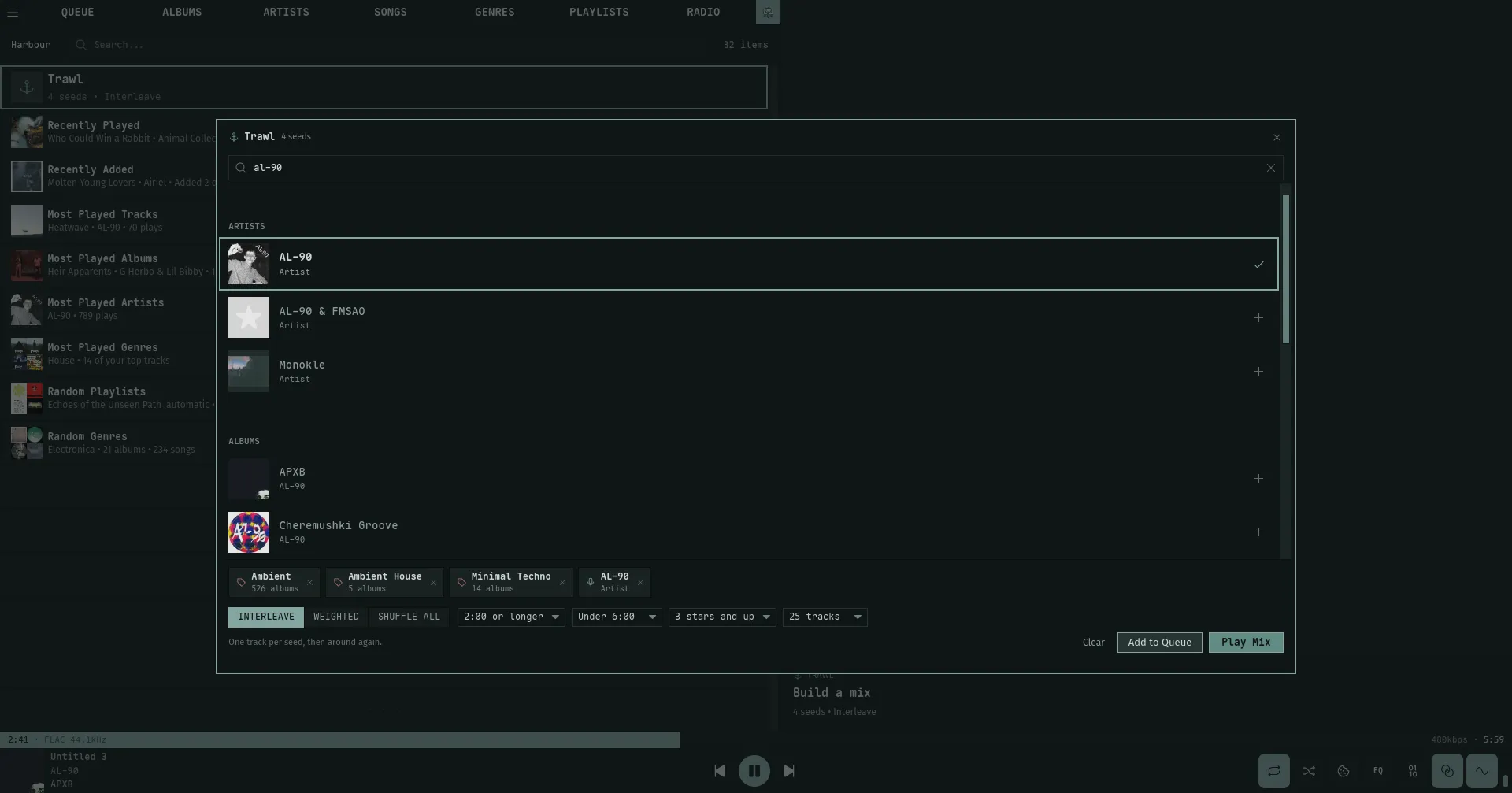
The crate is a workspace, not a saved playlist. It lives for the session: it survives closing and reopening the modal and accrues seeds while it’s shut, but it isn’t written to disk — logging out, switching servers, or restarting Nokkvi clears it.
Opening Trawl
Section titled “Opening Trawl”| Entry point | Where |
|---|---|
The t hotkey | Any view except Settings |
| The anchor row at the top of Harbour | Leads the shelf list; its subtitle shows the crate’s current size and blend |
| The anchor button in the Queue header | Next to the other header controls |
| Right-click → Add to Mix | On rows in Albums, Artists, Songs, Genres, Playlists, the Similar tab, and the Queue |
Add to Mix drops the focused row (or a whole selection) straight into the crate without opening the modal — a toast confirms Added N seed(s) to the mix (or Already in the mix if it’s a duplicate). It’s how you accrue a crate while browsing; open the modal later to blend and play.
Filling the crate
Section titled “Filling the crate”Inside the modal, the search bar at the top searches your whole library at once — artists, albums, songs, genres, and playlists together (the same search that powers Harbour). Type at least two characters; results come back grouped by type, each row with a + to add it to the crate (and a checkmark once it’s in).
Added seeds show as chips in the crate tray at the bottom of the modal, each with a type glyph, its name, and a remove button. The count in the title bar tracks the crate size.
Seed weights
Section titled “Seed weights”When the blend is set to Weighted (see below), each chip grows ‹ n › steppers. The weight runs from 1 to 5 and decides how many tracks that seed contributes per pass — a weight-3 seed lands three tracks for every one from a weight-1 seed. Weights are stored but hidden and ignored under the other two blend modes.
Blending
Section titled “Blending”The blend pills in the controls row decide how the seeds’ tracks are woven together:
| Blend | What it does |
|---|---|
| Interleave (default) | One track per seed, round-robin, then around again until every seed is spent |
| Weighted | Same round-robin, but each seed contributes its weight in tracks per pass (1–5) |
| Shuffle all | Every seed’s tracks are pooled together and shuffled evenly |
Across overlapping seeds — say an album seed and that album’s artist — a track never appears twice. Trawl skips a duplicate without spending the seed’s turn, so it keeps pulling until it lands a fresh track. That keeps the weighted ratios honest instead of letting overlap quietly eat a seed’s share.
Filters and caps
Section titled “Filters and caps”Album, artist, genre, and playlist seeds expand into all their songs, and four pickers in the controls row narrow what survives before blending:
| Picker | Options | Default |
|---|---|---|
| Minimum length | No minimum · 0:30 · 1:00 · 1:30 · 2:00 or longer | 1:00 or longer |
| Maximum length | No maximum · Under 6:00 · 8:00 · 10:00 · 15:00 · 20:00 | No maximum |
| Rating | Any rating · Unrated only · 1 star and up … 5 stars only | Any rating |
| Max tracks | No limit · 25 · 50 · 100 · 200 tracks | No limit |
A few rules make the filters behave the way you’d want:
- Songs you add by hand always play. A song seed — whether picked from the modal search or dropped in with Add to Mix — skips every filter. The filters only ever prune songs pulled in through a larger seed.
- The length filters ignore unknown durations. A track whose length Nokkvi doesn’t know (a stream, bad metadata) is never dropped by the minimum or maximum length filter.
- A star threshold drops unrated songs; Unrated only keeps just them. Set the rating filter to a star rating and anything you haven’t rated is excluded — unrated counts as below the bar, not exempt. Unrated only inverts that: the mix pulls only songs without a rating yet — never-rated or cleared back to zero — for a listen-and-judge queue.
- Big seeds are sampled to 50 tracks. Artist and genre seeds are trimmed to a random 50 songs each so one sprawling artist or genre can’t swamp the mix. Albums, playlists, and hand-picked songs go in whole.
- Max tracks is applied last. The cap truncates after blending, so the blend’s character (the round-robin or shuffle) survives the cut rather than the mix being trimmed seed-by-seed first.
If the filters remove everything, Trawl won’t play an empty mix — it tells you which filter emptied it (e.g. every song was under 1:00 — lower the minimum length) when a single filter is to blame, or asks you to loosen them when several are active together.
Playing the mix
Section titled “Playing the mix”Four buttons finish the job:
| Button | Keyboard | What it does |
|---|---|---|
| Clear | — | Empties the crate but keeps your blend and filter choices |
| Add to Queue | Shift + A | Blends the crate and appends it to the current queue; the modal stays open |
| Play Mix | Ctrl + Enter | Blends the crate, replaces the queue with it, starts from the first track, and jumps to the Queue view |
| Save as Playlist | Shift + P | Resolves the mix to concrete songs, then opens a Save Mix as Playlist name dialog |
The crate isn’t consumed by playing it — Play Mix keeps every seed so you can tweak a filter and replay. Think of it as a scratch pad you keep refining, not a one-shot.
Save as Playlist freezes the mix: it resolves the blend to a fixed list of songs and saves them as an ordinary playlist that won’t re-evaluate (the dialog says as much — Saves these N songs as an ordinary playlist — it won’t update). That’s the difference from a smart playlist, which stays live. It’s not a way to save the crate itself — the crate is a scratch pad and still clears on logout.
Keyboard
Section titled “Keyboard”The modal is built to run from the keyboard. It opens with the cursor in the search field, so you can start typing seeds straight away.
Search and list
Section titled “Search and list”| Key | Action |
|---|---|
Enter | Add or remove the centered search result |
Tab | Move down the list (also drops focus from the search field) |
Backspace | Move up the list (keeps search focus, so it keeps deleting text) |
/ | Return focus to the search field |
Shift + A | Add the whole mix to the queue — the keyboard twin of the Add to Queue button (append) |
Ctrl + Enter | Play the mix — the keyboard twin of Play Mix (replaces the queue) |
Shift + P | Save the mix as a playlist — the keyboard twin of Save as Playlist |
Escape | Close the modal (the crate survives) |
Tab leaves the search field while Backspace stays in it — the same asymmetry as the library views, where Backspace has to keep erasing your query.
Shift + A, Ctrl + Enter, and Shift + P are the mix actions in key form — append, replace, and save. Press any of them with an empty crate and Trawl says The crate is empty — add seeds first instead of doing nothing.
Editing the controls from the keyboard
Section titled “Editing the controls from the keyboard”The blend and the four filters — everything in the controls row — can be set without the mouse. Shift + Tab and Shift + Backspace walk a focus ring across that row, and Left / Right cycle the focused control’s value.
| Key | Action |
|---|---|
Shift + Tab | Step the ring forward — Blend → Minimum length → Maximum length → Rating → Max tracks, then back to nothing focused |
Shift + Backspace | Step the ring backward through the same controls |
Left | Step the focused control to its previous value (wraps around) |
Right | Step the focused control to its next value (wraps around) |
The ring has a resting slot — nothing focused — that every lap passes back through. That slot is how you let go of the arrow keys without leaving the modal: Escape is reserved for closing it, so stepping the ring back to nothing is what releases Left / Right. While nothing is focused, Left / Right do nothing.
Typing in the search field or pressing / also clears the ring — a focused search field owns the arrow keys, so the ring never fights it over Left / Right.