
Multi-library filter
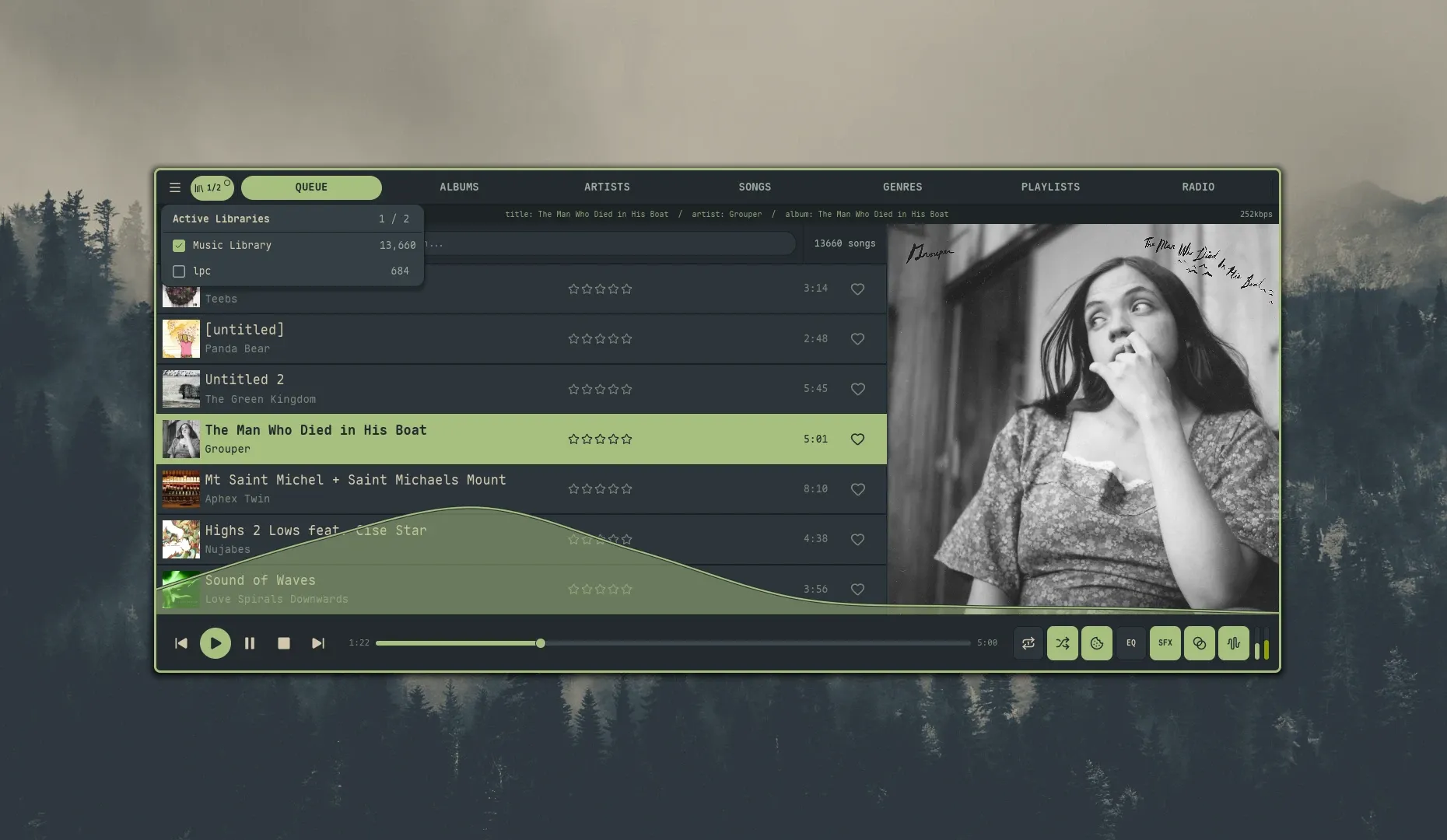
Navidrome can host more than one “library” — separate music collections (typically distinct music folders) on the same server. When you’re connected to a server with multiple libraries, Nokkvi can scope your main browse views — Albums, Artists, Songs, and Genres — to a chosen subset of them.
Where it lives
Section titled “Where it lives”In top-nav layout the library icon sits at the left edge of the nav bar, immediately after the hamburger menu and before the Queue tab. In side-nav layout it sits in the top cluster of the sidebar, directly below the hamburger menu and above the divider that separates the cluster from the view tabs. Clicking it opens the Active Libraries popover.
- Top-nav layout — icon-only chassis; once you’re filtering a strict subset, the trigger widens to show an
N/Mcount and an accent-bright pip in the top-right corner. - Side-nav layout — 32 px-wide chassis (at icon-tab height) matching the tab-cell width; in the filtered state the trigger keeps the same tab-width footprint with the icon left and
N/Mcount to its right, plus the accent-bright pip in the chassis top-right corner. - Single-library servers — the trigger is hidden. There is nothing to filter, so you’ll see no UI change.
The popover header shows Active Libraries on the left with an N / M count on the right, and each row shows the library name plus its song count (admin sessions only — non-admin accounts get a blank count).
How to use
Section titled “How to use”- Click a row to toggle that library on or off.
- Click the trigger again, or click outside the popover, to close it.
- An empty selection is treated the same as “all libraries on” — the icon-only neutral chassis renders in both cases because they share the same semantics (no filter is applied).
Switching libraries clears every paged browse buffer; the currently-visible view refetches immediately, the rest refetch the next time you visit them.
What it scopes
Section titled “What it scopes”The active set is applied to:
Playlists are not filtered. Navidrome’s /api/playlist endpoint doesn’t accept a library_id filter (the playlist table has no library_id column), and the server already scopes playlists per-user based on which libraries that account can access. Queue, Radios, and Settings have no library-scoped data and are unaffected.
Persistence
Section titled “Persistence”The active set is stored in the local state database at ~/.local/state/nokkvi/app.redb and restored on the next launch. If a library that was in your active set has been deleted on the server, it’s pruned out the first time Nokkvi refreshes the library list — you don’t need to do anything.