
Changelog — v0.14.x archive
Releases v0.14.0–v0.14.2, covering 2026-07-04 → 2026-07-06. The current changelog (v0.15.0 onward) lives in CHANGELOG.md.
v0.14.2 — 2026-07-06
Added
-
Love Change Notification (Settings → Playback → Rating Reminder, off by default): an opt-in desktop notification when you love or unlove from the love hotkey or
nokkvi love, for when the window is minimized or on another workspace. Clicking to star in-window stays silent. Mirrors the existing Rating Change Notification. -
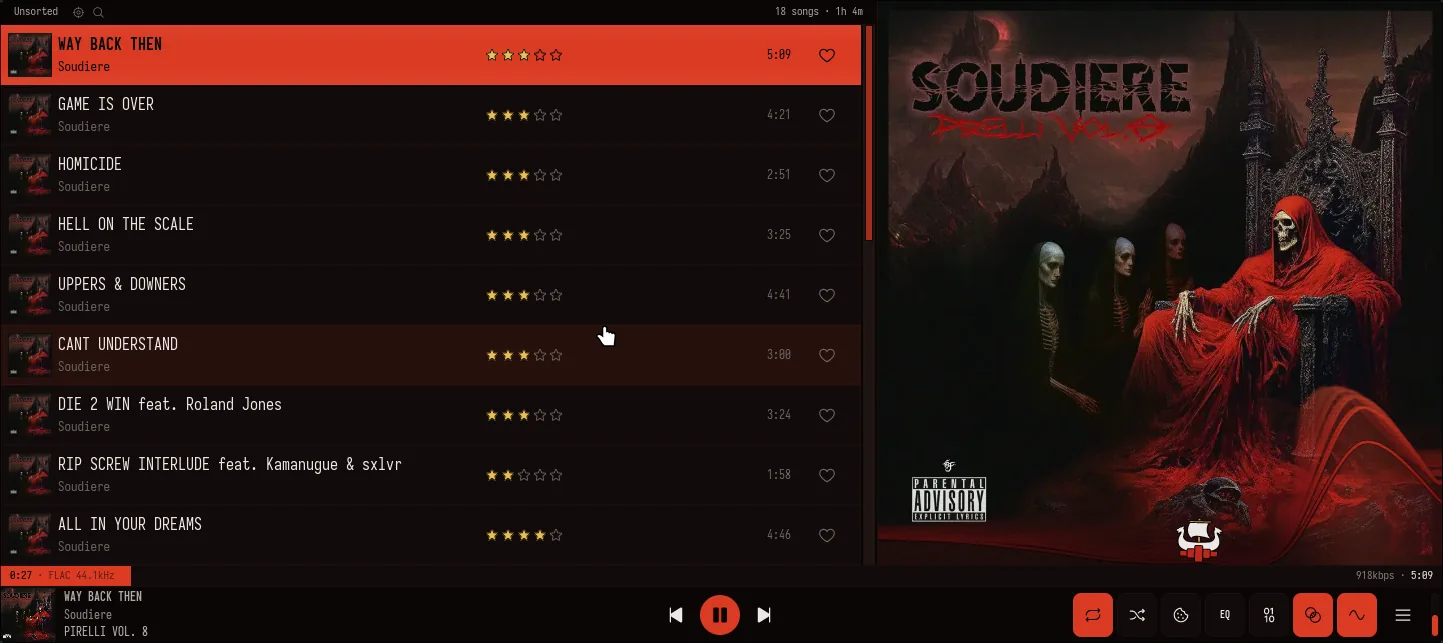
Enthroned theme: a new original dark theme derived from the cover of Soudiere’s PIRELLI VOL. 8. A warm near-black canvas under bone-white text, a deep robe-scarlet accent, ember-orange alerts, tarnished bronze-gold ratings, and a visualizer of blood-red bars capped with cold bone-white skull peaks. Ships with a matching “bleached bone” light companion.
Changed
- On the Lucide icon set, the Songs and Queue top-nav tabs now use clearer glyphs (a single note; a list with a play arrow) instead of two near-identical beamed notes.
Fixed
- A malformed server response on the Genres or Playlists views is now logged with a response preview instead of silently showing an empty list.
Removed
- The Kanagawa Dragon theme (the base Kanagawa theme stays).
v0.14.1 — 2026-07-05
Added
- Drag to the edge to auto-scroll: dragging a queue or playlist track near the top or bottom edge now scrolls the list automatically (about 10 rows per second).
Fixed
- Reordering a queue or playlist track no longer makes the lifted row cycle through other tracks when you scroll the list mid-drag.
- The playlist editor no longer drops a reorder on the wrong track when the list scrolls between grabbing a row and releasing it.
v0.14.0 — 2026-07-04
Added
- Crossfade Curve picker (Settings → Playback → Transitions) with three shapes: Equal Power (the new default, steady loudness), Constant Gain (the previous ~3 dB midpoint dip), and Linear (a plain straight-line fade).
- Minimum Track Length to Crossfade slider (0–60 s): 0 blends everything including short interludes, 30 blends only full-length tracks (previously a fixed 10 s floor).
- Keep Gapless Albums Seamless (off by default) skips the blend when the next track continues the same album, so authored segues stay tight.
- A new Fading section under Settings → Playback:
- Smooth Track Starts (on by default) ramps up the first ~20 ms of each track to remove the click when a skip or seek lands mid-waveform.
- Fade on Pause / Resume and Fade on Stop (off by default, 20–500 ms): soft gain ramps so pausing, resuming, and stopping no longer click.
- Fade Radio Switches (off by default): a short fade when starting a station or returning to the queue, timed to the stream’s first real audio so it doesn’t pop after the prebuffer.
- Fade on Skip (Off / Boundary Fade / Crossfade, default Off, 1–4 s): manual Next/Previous, clicking a queue track, or playing from a browse view can fade out or blend into the next track instead of hard-cutting.
- Skip Silence Between Tracks (off by default, never on bit-perfect streams): trims silent lead-ins from prepared tracks and starts the blend early over a silent outro.
- Gap / Overlap Trim (−2 to +2 s): hold a moment of silence between tracks, or start the blend early.
- Snap Crossfade to Musical Bars (off by default): rounds the blend to whole bars of the outgoing track’s BPM tag so beats line up; ignored when a track has no BPM tag.
Changed
- The default crossfade curve is now Equal Power, ending the ~3 dB loudness dip in the middle of blends between different songs.
- Fresh streams from play, seek, and skip now start with the ~20 ms de-click ramp (bit-perfect streams keep their instant onset).
Fixed
- Crossfades on the default path (Crossfade on, Bit-Perfect off) no longer dip to near-silence in the middle of the blend.
- A crossfade into a network stream that stalls right after starting now recovers and skips past the stall instead of hanging on its residue.
- Cancelling a crossfade after its midpoint no longer leaves the visualizer spectrum frozen until the next track change.